
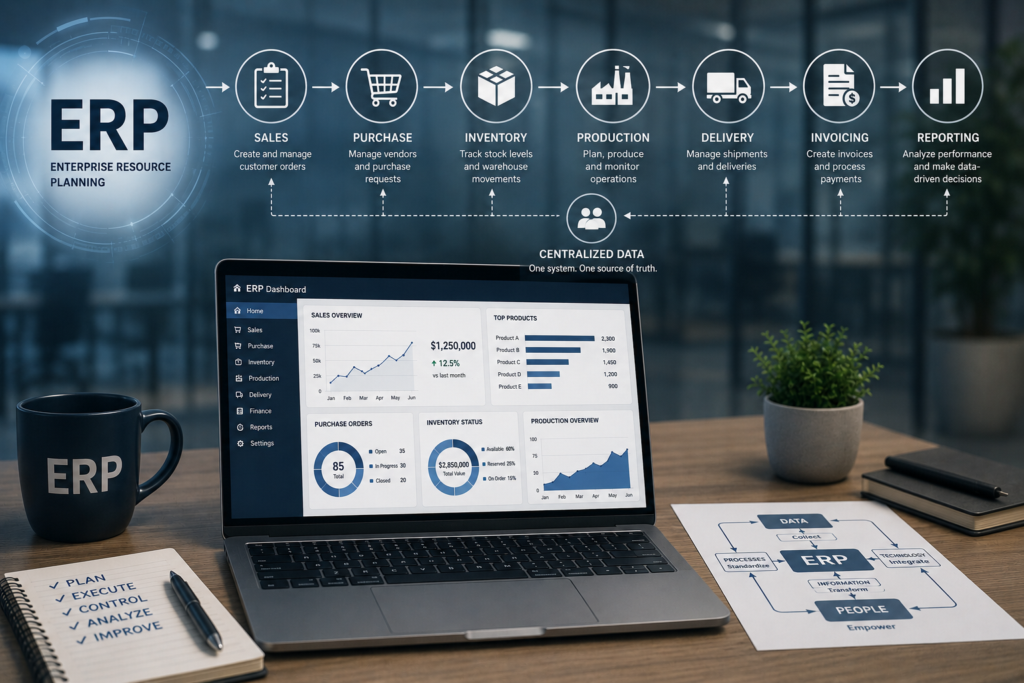
When an ERP system seems “complex,” the problem is rarely the system itself. Most of the time, the issue lies in the way approvals, exceptions, responsibilities, and the actual operational steps have been defined.
If you’re wondering how to configure ERP workflows so that teams can work faster, with fewer errors and better control, the answer doesn’t begin with menus. It begins with the business.
A well-configured ERP workflow doesn’t simply mean that a document moves from one stage to another. It means that the system reflects the way the company purchases, sells, manufactures, delivers, invoices, and reports. If it reflects those processes incorrectly, delays, duplicated work, unnecessary approvals, and poor visibility into costs and inventory are inevitable.
Where to Start When Configuring ERP Workflows
The first step is to separate the desired process from old habits. Many companies try to transfer into the ERP system exactly the same way of working they developed using Excel spreadsheets, emails, and phone calls. This leads to an overloaded system filled with exception after exception. Proper configuration starts with a simple question: what is the standard, repeatable workflow that delivers both control and speed?
At this stage, it is essential to document the complete flow of information. Who initiates a purchase request? Who approves it? When does it become a purchase order? How are the goods received into inventory? How is the invoice validated? Where is the financial impact reflected in accounting? If even one link in the chain is missing, the ERP system will compensate with manual work, reducing the value of the investment.
In practice, it is worth starting with the processes that have the greatest impact on cash flow, inventory, and delivery times. These are typically procurement, sales, inventory management, production, and financial approvals. Not because the remaining processes are less important, but because this is where both improvements and bottlenecks become visible the fastest.
How to Configure ERP Workflows According to Business Objectives
Not every workflow should be optimized for speed. Some should be optimized for control, others for traceability, and others for handling large transaction volumes. For this reason, configuration should be driven by business objectives rather than by the application’s structure.
In procurement, for example, the objective may be to reduce uncontrolled spending. In that case, the workflow should include budgets, approval thresholds, and a clear separation of responsibilities. In sales, the objective may be to accelerate order processing. Here, automated rules for inventory availability, commercial conditions, and delivery prioritization become essential.
In manufacturing, the focus is often on planning and actual material consumption. A poorly configured workflow may look correct on paper while distorting production costs or hiding operational losses. In retail and distribution, where transaction volumes are high and speed is critical, workflows should reduce manual intervention without sacrificing data accuracy.
This is where one of the most common mistakes occurs: companies require the same level of approval for every situation. The result is predictable. Teams wait, documents become blocked, and people begin working around the system. A well-designed workflow treats routine transactions, exceptions, and genuine risks differently.
Business Rules Before Screens and Buttons
Configuration starts with business rules. Who can create documents? Who can modify them? Who can approve them? Under what conditions? Without these rules, the ERP system becomes nothing more than a data entry tool instead of an operational control mechanism.
Approval thresholds are essential. A recurring office supply purchase should not follow the same approval path as a major contract or a purchase order with significant budget impact. Likewise, standard commercial discounts should not be treated as sensitive exceptions. If everything requires the same level of attention, nothing receives the attention it truly deserves.
Next come the exception rules. What happens when a supplier delivers only part of an order? When a customer requests changes after confirmation? When goods are received with discrepancies? Or when production consumes more materials than planned? These scenarios are not minor details. If they are not considered during the configuration phase, they will inevitably lead to improvised solutions after go-live.
A properly configured ERP system does not try to eliminate every exception. It manages them consistently and predictably. That is the difference between a system people use every day and one they actively avoid.
Roles, Permissions, and Responsibilities
Any serious discussion about how to configure ERP workflows quickly comes down to user roles. Defining the process stages is not enough. You must also clearly establish who performs each step and what each user is allowed to see or modify.
In growing companies, one of the classic problems is the overlap between execution and control. The same user creates, approves, and completes the transaction. In the short term, this may appear efficient. In the long term, however, it increases the risk of errors, reduces traceability, and makes internal audits more difficult.
For this reason, permissions should be configured according to actual job functions rather than individual preferences. A procurement specialist requires a different level of access than a finance director. A warehouse manager needs different information than the sales team. When roles are properly configured, workflows become faster because each user sees only the information needed to perform their responsibilities.
There is also a balance to be found. If access is too restrictive, people cannot work efficiently. If too much freedom is granted, control is lost. Effective configuration strikes the right balance between operational autonomy and process discipline.
Useful Automation, Not Excessive Automation
Automation is valuable only when it reduces manual work without concealing risks. Not every step should be automated. Sometimes human validation is exactly what is needed, especially in processes involving financial impact, contracts, or regulatory compliance.
For example, automatically generating documents from one stage to another can save time and reduce data entry errors. On the other hand, automatically approving commercial exceptions may create bigger problems than the time it saves. Everything depends on frequency, value, and risk.
One simple principle is particularly useful: automate what is repetitive, standardized, and measurable. Leave human oversight where context matters. That is how organizations achieve greater speed without compromising decision quality.
For companies implementing SAP Business One, one of the key advantages is that many workflows can be configured to support both process discipline and operational flexibility. However, flexibility must be designed from the beginning. When it is introduced later, it usually results in higher costs and more difficult maintenance.
Testing Workflows in Real-Life Scenarios
One of the most expensive mistakes is inadequate testing. If you only test the ideal scenario, problems after go-live are almost guaranteed. Workflows should be tested using real business scenarios, including the uncomfortable ones.
This means verifying not only the standard end-to-end process, but also partial deliveries, returns, price differences, inventory shortages, approval changes, cancelled documents, closed accounting periods, and absent users. An ERP workflow is successful when it withstands everyday business operations, not only when it works during a demonstration.
It is also valuable to involve key users from every department in the testing process. Their role is not limited to validation. They quickly identify unnecessary steps and frequently occurring exceptions that may have been overlooked. This is where an experienced implementation partner makes the difference between a theoretical configuration and one that performs reliably in real business environments.
Measuring Whether the Workflow Works
Once configuration is complete, the right question is not whether the workflow exists, but whether it delivers results. Approval times, the number of manual interventions, the frequency of exceptions, inventory accuracy, on-time deliveries, and visibility into costs are far more meaningful indicators than the number of rules configured within the system.
If approvals take too long, there may be too many approval levels. If users continue working in Excel, the workflow is probably not providing the right information at the right moment. If inventory adjustments become frequent or discrepancies appear between operational and financial records, the workflow is not sufficiently connecting departments.
ERP workflow configuration is not something that ends at go-live. As companies grow, new sales channels, higher transaction volumes, and additional reporting requirements emerge. Workflows should be reviewed continuously so they support growth rather than slow it down.
What Should Be Avoided from the Beginning
There are three common pitfalls worth avoiding. The first is configuring workflows according to the organizational chart instead of the business process. The second is mechanically copying old working habits. The third is requesting custom developments before determining whether the process can be standardized.
Many companies request customizations too early. Sometimes they are justified, especially in industries with specific requirements. However, in many situations, well-designed configuration combined with better process discipline solves the problem without making the system more complex. The more unnecessary complexity you introduce, the more expensive the system becomes to maintain.
If you want to configure ERP workflows correctly, start with the critical business processes, establish clear business rules, define user roles, test exceptions, and measure the results. Serra Software follows exactly this approach: analysis, configuration, control, and continuous improvement. Not to fill the system with additional steps, but to help companies operate more efficiently, with greater clarity and better decision-making.
A well-configured ERP workflow is not recognized by its complexity. It becomes evident when teams no longer waste time searching for information, approvals happen where they truly add value, and management can run the business using reliable data rather than assumptions.