
Data migration rarely fails because of a wrongly imported file. Most problems appear much earlier — when a company decides to migrate data into SAP Business One without clear rules, defined responsibilities, or a realistic understanding of the quality of the data stored in legacy systems. The result becomes visible immediately after go-live: inaccurate inventory, unbalanced financial figures, duplicated business partners, and teams that lose trust in the new ERP.
For a growing company, data migration is not an isolated technical exercise. It is a critical business stage. If the data enters SAP Business One correctly, sales, procurement, finance, and reporting processes start with a solid foundation. If not, the new ERP simply inherits the exact chaos it was supposed to eliminate.
What It Means to Migrate Data into SAP Business One
When we talk about migration, we are not simply referring to moving tables from one application to another. In practice, it means selecting, cleansing, transforming, validating, and loading relevant data into the SAP Business One structure. This includes both master data and transactional data, depending on the project objectives.
Master data is usually the first starting point: customers, vendors, items, price lists, G/L accounts, cost centers, employees, and other core business structures.
Then comes the more sensitive question: what should be done with historical data?
There is no universal answer. Some companies only need opening balances and open documents. Others also require sales, purchasing, or inventory history for comparative analysis.
The right decision depends on the industry, reporting requirements, auditability needs, and the quality of the source system. Migrating everything is not always the best decision. Sometimes it costs more than the value it actually delivers.
Why SAP Business One Data Migration Projects Become Complicated
In many organizations, data does not exist in a single system. Part of it is stored in the legacy ERP, part in Excel files, part in local applications, while some information survives only through employee habits and manual processes.
When the project begins, the first uncomfortable truth appears: the company does not have a single version of reality.
The second issue is the lack of data governance rules. Who decides which customer remains active? Who approves item coding structures? How should products without standardized units of measure or duplicated vendors be handled?
Without firm decisions, migration quickly turns into a series of improvisations.
There is also timeline pressure. Many companies leave migration activities until the end, as if migration were only an execution step. In reality, it is a workflow that must start early and go through multiple cycles. The first upload is rarely the correct one.
How to Properly Plan a Migration
A healthy project starts with defining the scope. Not all data needs to be migrated, and not all objects should be migrated in the same way.
It is essential to decide from the beginning what enters SAP Business One at go-live and what remains archived in the legacy system for reference purposes.
The operational model must also be clarified. If the new ERP introduces different processes, the data must be prepared according to the new logic.
For example, if the previous system allowed a loose item structure and the new ERP requires control through categories, attributes, units of measure, and barcodes, the migration must support this new framework. There is no value in moving disorder into a platform designed to create standardization.
A good plan includes clear responsibilities across every area: finance, sales, procurement, logistics, production, and IT.
Consultants may define the migration methodology and execute the import, but business teams must validate the actual data content. This is where many delays appear: files are delivered late, incomplete, or without internal validation.
What Data Should Be Migrated — and What Should Be Left Behind
The most efficient approach is usage-oriented.
Data that supports daily operations and initial reporting should be migrated correctly from day one. This usually includes active business partners, active items, inventory, opening balances, open documents, and relevant commercial rules.
Full historical migration is a separate discussion.
If the company requires multi-year analysis directly inside the ERP, historical migration may be justified. However, if the information is rarely used and can remain accessible through an archive, migrating all historical transactions may unnecessarily complicate the project, increase testing time, and introduce difficult-to-control errors.
In other words, migrate what helps the company operate and make better decisions from day one. Everything else should be evaluated pragmatically, not emotionally.
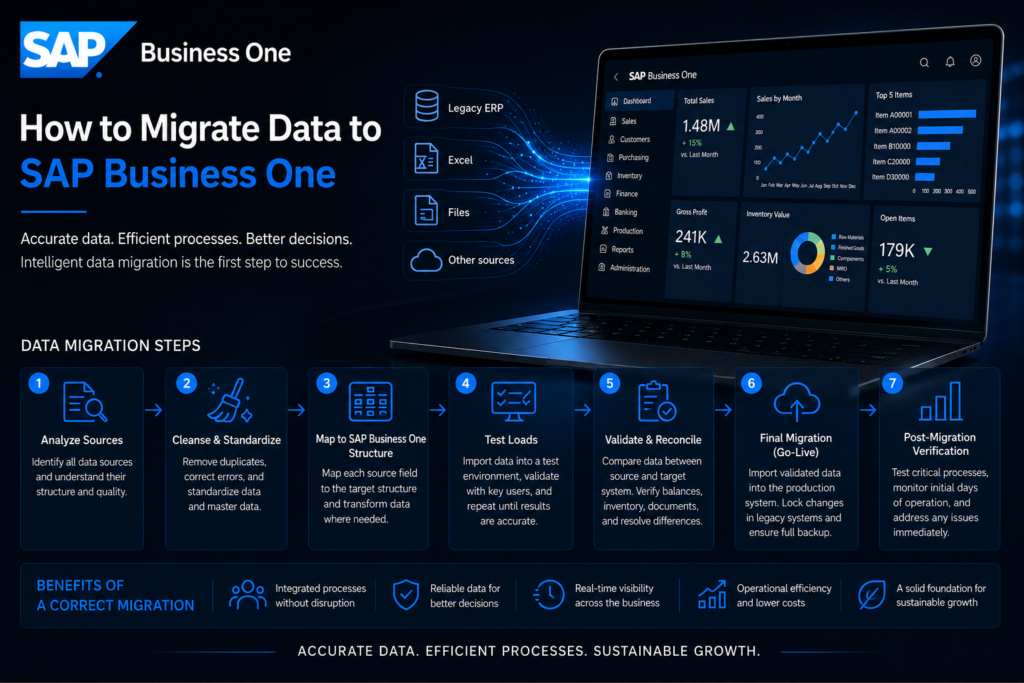
The Correct Steps for Migrating Data into SAP Business One
1. Analyze Data Sources
The first step is identifying all data sources: legacy ERP, Excel files, satellite applications, auxiliary databases, and operational reports.
Without this map, the project starts with blind spots.
2. Cleanse and Standardize Data
This stage removes duplicates, corrects errors, completes mandatory fields, and standardizes master data structures.
It is one of the least glamorous stages — and one of the most valuable. A fast import of poor-quality data creates expensive problems later.
3. Map Data into SAP Business One Structure
Every source field must be correctly mapped to the target structure.
Sometimes mapping is simple. Other times, transformation is required: account recoding, reorganized item groups, updated tax rules, or warehouse restructuring.
This is where migration either supports the new operational model or sabotages it.
4. Perform Test Loads
Data is imported into a test environment and validated together with key users.
This process must be repeated. The first cycle identifies gaps. The second validates corrections. Sometimes a third cycle is needed for sensitive data such as balances, inventory, and open documents.
5. Business Validation
Technical success alone is not enough.
Business teams must confirm that the imported data makes operational sense.
A customer may be technically imported correctly while still having incorrect payment terms, missing credit limits, or wrong fiscal information.
Technically successful does not always mean operationally correct.
6. Final Migration and Post Go-Live Control
Before final migration, a clear cut-off moment must be established for source data.
After go-live, immediate verification is essential: balances, inventory, open documents, VAT, pricing, stock availability, and critical reports.
Real Risks That Should Be Controlled Early
The biggest risk is not the visible error — it is the small error that silently propagates through operations.
An item with an incorrect unit of measure affects procurement, receiving, inventory, and sales.
A wrongly classified business partner affects documents and tax reporting.
An incorrect opening balance damages trust in the financial module.
Another common mistake is treating migration as a pure IT project.
In SAP Business One, data directly affects how the company operates. That is why migration must be led jointly by consultants and business stakeholders — not passed between departments.
Testing is also frequently underestimated. Companies test screens and workflows, but not enough data consistency.
A stable go-live depends on both.
What Makes the Difference Between a Successful Migration and One That Is Merely Finished
The difference is discipline.
A successful migration includes clear data governance rules, defined data owners, multiple testing cycles, and acceptance criteria.
A migration that is merely “finished” simply completes the import and hopes users will fix the remaining issues later.
In serious ERP projects, migration is treated as part of operational transformation.
That means structured decisions, documented validation, and a team that understands data is the foundation of business processes — not just an appendix to implementation.
Serra Software approaches this stage with exactly this mindset: analysis, structure, controlled execution, and validation focused on real operational usage.
For companies that want to scale intelligently and eliminate operational bottlenecks, the right question is not whether they can move the data.
The real question is whether they can migrate it in a way that allows SAP Business One to start with control, clarity, and trust.
That is where the real value of a well-implemented ERP begins.