
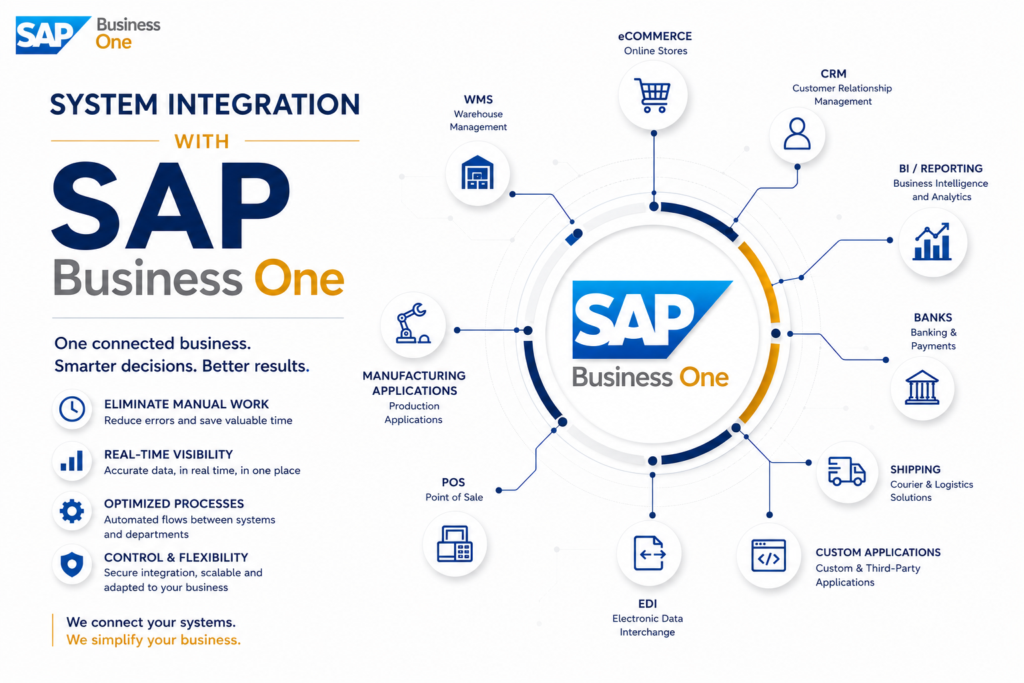
When sales increase, the warehouse works in one system, accounting in another, and the sales team still updates multiple Excel files, the problem is no longer the lack of software. The problem is the lack of integration. A well-designed system integration with SAP Business One brings data into the same operational flow and reduces wasted time, errors, and decisions made based on incomplete information.
For many growing companies, SAP Business One becomes the operational command center. But its real value appears when it is properly connected with the platforms that support day-to-day activities — online stores, WMS, manufacturing applications, courier solutions, CRM, BI, POS, EDI, or internally developed applications. Without these connections, the ERP risks remaining correct in theory but incomplete in practice.
Why System Integration with SAP Business One Matters
In business, fragmented data comes at a cost. It creates delivery delays, stock discrepancies, incorrectly issued invoices, manual reconciliations, and a lack of clear visibility into profitability. When every department works in a separate application and information is transferred manually, companies lose control exactly where it matters most.
System integration with SAP Business One is not just about exchanging data between two applications. It means defining which system is the source of truth for every type of information, when data should synchronize, what validation rules apply, and how exceptions are handled. This is where the difference appears between an integration that simply moves data and one that truly supports real operations.
A simple example is the relationship between an online store and the ERP. If orders automatically enter SAP Business One, but prices, stock levels, and delivery statuses are not aligned in real time, the result is not efficiency. It creates customer confusion and additional pressure on internal teams.
Which Systems Are Most Commonly Integrated
In ERP projects, companies rarely start from scratch. They already use applications that must either be maintained, replaced, or connected. That is why integration discussions should begin during the analysis phase, not after go-live.
The most common scenarios include connecting SAP Business One with eCommerce platforms, POS applications, WMS solutions, manufacturing systems, CRM platforms, banking services, courier applications, marketplaces, and reporting tools. In retail and distribution, the main focus is usually the synchronization of stock levels, prices, and orders. In manufacturing, attention shifts toward planning, material consumption, traceability, and cost control. In service-based businesses, the key objective is financial visibility and control over contracts or projects.
Not all integrations have the same complexity. Some are standard and repetitive, while others require custom business logic, data transformations, and precise operational rules. That is why the right approach is not simply “connecting systems,” but rather “defining the critical business flows.”
What a Proper SAP Business One Integration Looks Like
A successful integration starts with the process, not the API. First, you define what event triggers the flow, who uses the data, what validations are mandatory, and what happens when exceptions appear. Only after that do you choose the appropriate technical method.
In practice, several decisions directly influence the outcome. The first is establishing the source of truth for master data — customers, items, prices, stock, orders, and financial documents. Without this clarity, duplicates, overwrites, and inconsistencies quickly appear.
The second decision concerns synchronization frequency. Some flows must work almost in real time, such as available stock or online orders. Others can run at defined intervals without operational impact. Treating every integration as real-time unnecessarily increases complexity and costs. Scheduling them too rarely reduces business responsiveness.
The third decision relates to monitoring and control. A serious integration does not work on the principle of “launch it and see what happens.” You need logs, alerts, retry rules, traceability, and clear ownership of incidents. Without these elements, even a small error can go unnoticed and affect dozens or hundreds of documents.
Where the Most Common Problems Appear
Many integrations fail not because of technical limitations, but because of poor analysis. Companies begin with a list of desired connections without deciding which processes should be standardized and which exceptions are acceptable. The result is an architecture that looks complete but does not solve the real operational bottlenecks.
One common issue is poor data mapping. The same customer may exist under different names across systems, units of measure may not match, product codes may be managed differently, and VAT or accounting rules may not align. In such cases, the integration transfers data, but not the correct operational meaning behind it.
Another problem is over-customization. If every exception becomes a rule in development, the integration becomes difficult to maintain and expensive to change later. Sometimes it is healthier for the business to simplify the process rather than force software to replicate years of operational improvisation.
There is also the risk of unclear responsibility between vendors. When the ERP is implemented by one company, the online store by another, and the infrastructure is managed separately, every issue can turn into a blame exchange. That is why project governance matters almost as much as the technology itself.
What Benefits Integration Actually Brings
The real benefits are not measured by the number of interfaces created, but by reduced operational effort and improved control. When data flows correctly between systems, people no longer re-enter information, manually verify what is correct, or spend hours reconciling different sources.
For management, the biggest advantage is visibility. You can clearly see what is selling, what is being delivered, where bottlenecks appear, what margins you generate, and where resources are consumed. For operations teams, the advantage is speed with discipline. Orders move faster through workflows, stock levels become more reliable, documents are generated consistently, and exceptions are easier to track.
For finance teams, integration reduces discrepancies and delays between field activity and system records. For IT teams, a well-designed architecture simplifies support and future changes. For the business as a whole, this means the ability to scale without adding chaos as volume grows.